Please be advised that the latest update for the Wii blocks DNS redirection for the Wii Shop Channel, do if you are developing something and do not want to lose browser access do not install the update. And so begins the arms race between wii hackers and nintendo... With quick turnaround time like that you can be sure that Nintendo is going to put up a good fight to make sure people are not downloading their games for free.
UPDATE: SiteDude of WiiModWii suggested that people who do not want to download Wii updates add the following hostname to their DNS so that firmware updates will not automatically download: ccs.shop.wii.com
As a reminder this site does not condone anything related to the act of getting Nintendo Wii or Virtual console games for free. Please do not post anything of this nature in the comments. If someone else has posted these materials, please notify me, liquidice629 at gmail.com
The 'Hacks' in the title refers to tinkering with the Wii to get it to do things it was not meant to do, and making modifications to the hardware and software to allow execution of user created wii homebrew applications. If you would like to contribute an article to the site, or if you have information that has not been discussed on here related to hacking the wii, contact me: liquidice629 at gmail.com
Finally thanks for all of the webmasters who have linked me. I will be creating some better linking materials to send to you soon. If you have a established Wii hacking related site and would like to see it listed here, drop me an email.
Cliff has released an app for Mac OSX which will allow you to pair the Wiimote with your Mac to view and send commands. This is NOT a full blown driver, but now that the initial hooks have been made it will be much easier for other developers to get in on the action to start coding the other parts of the driver. You can download RVL Enabler for OSX from Cliff's site: http://windower.net/RVLEnabler.zipSource Code is here: http://windower.net/RVLEnablerSource.zip
UPDATE: A new OSX application for controlling the wiimote has bee posted here.
Marcan has posted a video showing his progress on WiiMote Development. He has a nifty little program that will allow you to see graphs of the data that comes from the remote as you wave it in the air. By using these measurements and calculations developers will eventually be able to predefine gentures and movements of the wii-mote in their software applications.
http://youtube.com/watch?v=9iBaKsh5z_o
Great work Marcan! When will we be able to get our hands on this demo app so we can see the pretty colors on our own screen?
Volsung, Wiilii, and others are busy documenting all of the math involved in the wii-mote over on the Wiili Wiki:
http://www.wiili.org/Motion_analysis
Also Cliff in IRC Efnet #wiidev has made progress on a linux i/o driver for the wii-mote. Nothing to test yet, but when code is released you can be sure it will be posted here.
There is some talk about DS to Wii Interaction. Since the DS has already been hacked every which way, it may be possible to write code for the DS that will send data to the Wii to unlock arbitrary code execution. So far no games have been released which support the DS to Wii functionality, so we will have to keep this idea on the backburner for now.
Also, as development on the wii-mote progresses developers are desperately trying to figure out if there is a way to put their own code into the memory of the wiimote. Since the contents of the Wiimote's memory can be sent back to the Wii, there is the possibility of arbitrary code execution through that route as well.
Also, Excite Truck allows you to play MP3s off the SD card. All of the usual tricks failed or are ignored, no luck there...
As you may have heard, component cables for the wii are still in high demand and short supply. That does not stop hackers from enjoying their Nintendo Wii in full high def.
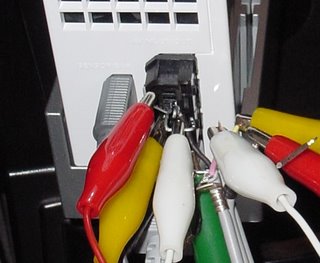
This guy took it upon himself to go above and beyond the call of duty and make his own hdtv cables for the Wii. Unless you know what you are doing, please do not try this at home...
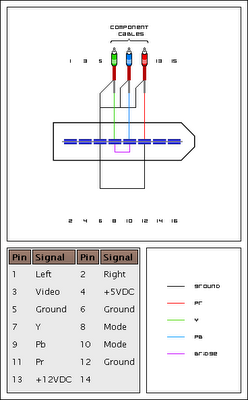
Pinout for wii a/v port posted by Rakien:
--
Also some encouragement by Lee Swain:
I just wanted to post a thank you to everyone who worked on the pinout and guides for this.
I created mine last night and it was VERY EASY, thanks to the great work of others. With my $4 worth of crocodile clips and paper clips I was able to complete the entire mod in about 20 minutes and it works perfectly. It's really nice to see Zelda in 480p on my 42inch widescreen HDTV ;-D
Also for those attempting this, please note that I found that grounding the Y cable to one of the exisiting grounds GREATLY improves the picture quality, before I did that I was a little disspointed with it. But thankfully that lasted about 30 seconds until a remembered that I hadn't grounded the cables yet. I grounded all of them but it only seemed to matter that the Y was grounded.
Here's my personal guide to make things easier for newbies, use this as a basic outline along with the other awesome guides.
First get the wires ready and take the back off the Wii composite cable. Make your paperclips ready for inserting into the Wii cable connector and plug it into the back of the Wii. Turn the Wii on.
1. With the composite cables in attempt to get your bridge connected first. Once it's connected the image will drop out and you will know it's working, then you can plug it into a component in on your TV.
2. Next attempt to do the Y cable, that way you will know the connection is working right away because you will get a black and white image.
3. Then attempt your CR and CB cables, you will see the colours come in as soon as you get each one in right.
4. Now add a connection to the ground and connect the ground from at least the Y cable.
DONE!
For those still unsure about attempting this, let me say that it's a LOT easier than you probably think. Don't be scared away by the pictures that make it look really messy.
It's essentially as easy as sticking a paperclip in a hole and attaching a wire to it and then repeat X 3.
Good luck! If you need help here are some more links: http://nfggames.com/wiki/doku.php?id=av:wii_multi_av_pinouthttp://nfggames.com/forum/index.php?showtopic=2387Source: x-scene wii forums and nfggames.com forums
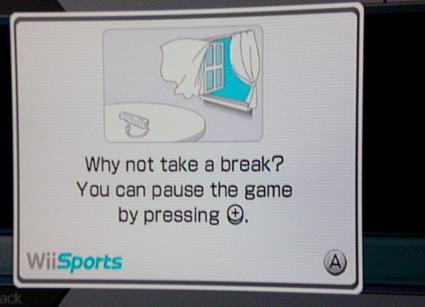
I love how Wii Sports suggests to take a break every once in a while.
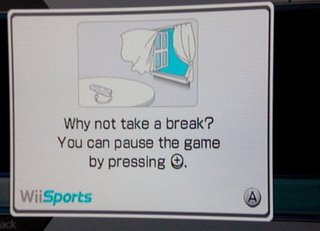
Fortunately the Hacking never stops over here.. Big news is just around the corner, so go take a break, perhaps even jump out your window as pictured above, and come back later when I will tell you all about what's transpired in the wonderful world of Wii Hacking.
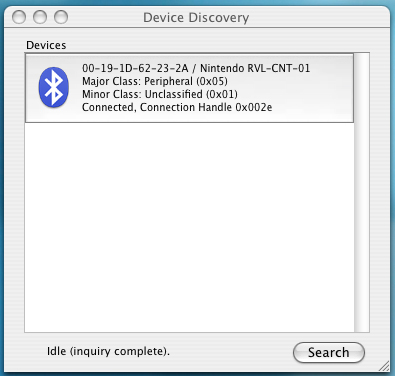
I figured out a little trick with the wii-mote last night. The wii-mote is paired with the Wii, so you usually will not see it when you do a bluetooth 'discover all devices' on the PC.
But, If you press buttons 1 and 2 at the same time on the bottom of the wiimote it puts it into a discovery mode where the lights on the bottom are blinking. Now if you try to discover nearby devices on your pc you should see the wii-mote and can attempt to pair it.
UPDATE 11/26/06 5PM:
You can also put it into discovery mode by pressing the sync button under the battery cover. The remote doesn't actually have a passkey, however once it is connected, the 3 services it advertises are non standard bluetooth services. Until someone writes a wii-mote driver we can't do much with this hardware.
For specifics on the Wii's Bluetooth check out
WiiLii Wii Bluetooth Wiki Entry
and
WiiLi Wimote Driver Wiki
UPDATE 11/26/06 3AM:
Progress has been made! some developers have made the initial connection to the bluetooth remote and can now control the LEDS and force feedback.
The developer has posted a patch for getting bluetooth communication working and even posted a little script that makes the lights on the remote dance.
If you want to help you can join in on the conversation here on the Wiili forum.
UPDATE 11/26/06 11AM
Looks like it's time to break out the Math books, Andy on the Wiili forums has figured out how to log linear force data.
They have begun to write the algorithms which will be used to detect movement, speed and rotation of the wii-mote when it is connected to a pc or mac.
* Linear force data can be logged using a SET_REPORT HID request on Output channel 12. The first parameter is a force feedback parameter while the second must be 31. Some other 3X numbers work for the 2nd parameter and do different things, but I'm not sure what exactly. Logging can be turned back off using 30. (example to turn logging on: 52 12 02 31) When logging data data with 31 the last 3 bytes of data represent the forces with ~80 being 0 force. The 1st bit represents the side to side force, the 2nd is the lengthwise force and the 3rd is the up-down force.
Here is some additional code that will work in the Wii's Shopping Channel Browser. There are some additional sounds, music, and the code to get rid of the 'loading' widget:
<script>
//Init and Cleanup Browser 'Waiting'
var shop = new wiiShop();
function wiiStartWaiting()
{
if (shop != null && "beginWaiting" in shop) {
shop.beginWaiting();
}
}
function wiiStopWaiting()
{
if (shop != null && "endWaiting" in shop) {
shop.endWaiting();
}
}
shop.endWaiting();
//Init On Screen keyboard
var kbd = new wiiKeyboard();
kbd.call( 0, limitrow=1 );
//Init Sound
function playSE(id){
var snd = new wiiSound();
snd.playSE(id);
}
function playBGM(id){
var snd = new wiiSound();
snd.playBGM(id);
}
</script>
Textbox calls up on-screen keyboard:<br>
<input type="text" value=""><br><br>
Sounds:<br>
<input type="button" onclick="playSE(1)" value="slide">
<input type="button" onclick="playSE(2)" value="focus">
<input type="button" onclick="playSE(3)" value="decide">
<input type="button" onclick="playSE(4)" value="cancel">
<input type="button" onclick="playSE(5)" value="choose">
<input type="button" onclick="playSE(6)" value="error">
<input type="button" onclick="playSE(7)" value="addpoint">
<input type="button" onclick="playSE(8)" value="ok">
<input type="button" onclick="playSE(9)" value="jump">
<input type="button" onclick="playSE(10)" value="jump2">
<input type="button" onclick="playSE(11)" value="fireball">
<input type="button" onclick="playSE(12)" value="coin">
<input type="button" onclick="playSE(13)" value="bump">
<input type="button" onclick="playSE(14)" value="swim">
<input type="button" onclick="playSE(15)" value="connecting">
<input type="button" onclick="playSE(16)" value="wireless">
<br><br>
<input type="button" onclick="playBGM(1)" value="start music">
Joat is busy toning out all of the leads on the Wii's motherboard. If you are looking for any of the following tech specs, Joat is your man. He took apart his Wii and it is not going back together any time soon, so if you have any info to help him, go see him on these forums
He has already posted information on the following topics:
Wii DVD Drive Specs, Information, and Pinout
RVL-RTC
Deconstructing the Wii - Step by Step instructions on taking apart the Nintendo Wii
Also, somewhat related...
We now live in a society where every time a new electronic comes out someone has to smash it and put the video out on the internet... The Nintendo Wii is out, so it must be smashed:
http://www.planetboredom.net/video.php?id=2951
http://nfggames.com/wiki/doku.php?id=av:wii_multi_av_pinout
For those not willing to wait for Nintendo to stock their high definition cables (now selling for over $150 each on ebay), here are the wii pinouts for you to make your own Wii component cable or Wii rgb cable.
Some new information about the browser hacking going on inside the Wii's Shopping channel:
There is a piece of code found in the shopping channel:
var ec = new ECommerceInterface ();
The problem is that the code for ECommerceInterface isn't found in any of the .JS files. This leads me to believe the code is somehow stored in the Wii itself. Source: FunWithWiiWhile we do not support trying to download games for free, it is extremely interesting how these Javascript functions are included in the browser itself so that they are availible in every page displayed and not in the source of the pages served up from Nintendo. Has anyone tried to access urls with file:// or others?
On the PSP we were able to access some of the flash file system by using different internal addresses. The full PSP thread which talks about overflowing the buffer and the internal addresses via the wipeout browser dns hack can be found here:
http://forums.ps2dev.org/viewtopic.php?t=1948
UPDATE:
OK I've got the on-screen keyboard and sounds working!
Updated Code posted here
It didn't take long for the guys over at mozy.org to fire up the wifi sniffer and analyze what the wii does when it connects to Nintendo's network. LOTS of valuable information to be found here including the Wii's HTTP User Agent String, which is needed to get pages served to a PC.
You can spoof your User Agent using some Firefox extensions if you want to check it out for yourself, but the full in-depth look at what was found can be read here:
http://mozy.org/wii/
Wii User Agents:
Wii Shop Channel agent, runs when you're shopping the wii shop.
Opera/9.00 (Nintendo Wii; U; ; 1038-58; Wii Shop Channel/1.0; en)
Wii Updater, runs when the Wii is getting it's system (firmware) update.
wii libnup/1.0
Virtual Console downloader, runs when the download for a VC game begins.
libec-3.0.7.06111123
WiiConnect, checks for Updates and New content.
WiiConnect24/1.0FC4plus1 (build 061114161108)
The user agents are all used in different instances (obviously). Sometimes the user agent doest even matter, but other times you get redirected to wii.com if your UA is wrong.
All of these wii http codes were found using a packet sniffer.
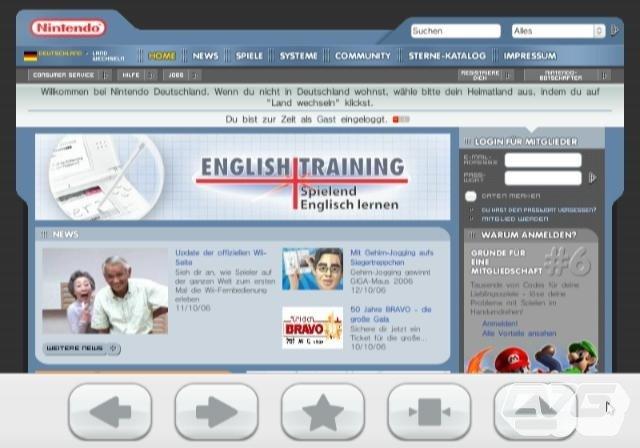
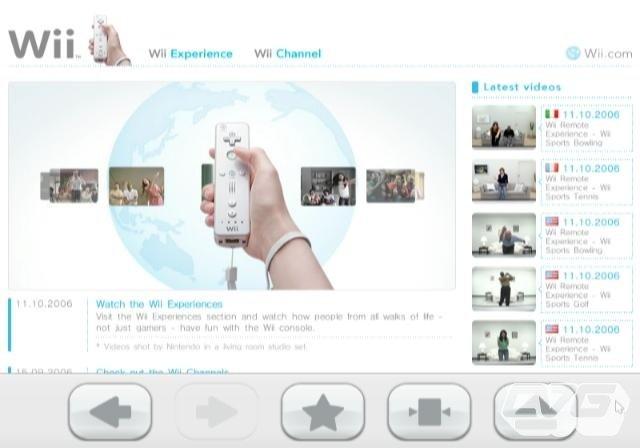
Here are instructions to get a somewhat working web browser on the Nintendo Wii by redirecting the content of the Wii Shopping Channel.
Basically you would download Simple DNS or another DNS server package and redirect oss.shop.wii.com to the ip address of your choice.
---
For example, to do it in Simple DNS Plus:
Download and Install Simple DNS Plus from: http://www.jhsoft.com/
Launch Simple DNS Plus and goto Tools -> Edit DNS Records
In the DNS records goto tools --> Quick Domain Wizard
In the domain field type "oss.shop.wii.com"
for the webserver ip type in the ip of the website in as the "Web Server IP"
(if you want to find out the ip goto cmd prompt and type ping sitename.com)
For example, Google's IP is 64.233.167.99
Erase the secondary DNS Server and press OK
Now, on the Wii
Goto the Wii Menu -> Wii Settings -> Internet -> Connection Settings ->
Chose your connection -> Change settings
Click next 3 times until you get to the DNS setup
Click Advanced Settings
Then enter the primary DNS as your computers IP address of the computer running Simple DNS
Finally, click ok and launch the Shopping Channel, it should bring up google now!
Source: WiiModWii
--
This works, well, kinda.
It does load the Google Homepage, and all links within the main www.google.com domain are clickable. I quickly tested a flash page, but it did not load, just a white box. There is also a loading widget that goes in front of the screen and will not go away. I suppose some Javascript can get rid of it.
There is no onscreen keyboard that pops up when you select a textbox, hopefully it can be triggered with some javascript as well..?
Next step is for someone to get the urls and header information the wii shopping channel browser uses and try to see if you can access the wii shopping pages on your pc. Then we will be able to see what kind of javascript or other types of applets are used to display the wii shopping channel.
Also going to try out how it handles file downloads. Will post back with updates.
Nice find wiimodwii! Lets get crackin on some Wii homebrew fellow web developers.
UPDATE:
Work is underway to create a Wii Portal page similar to the PSP Portals that popped up back in the day when the Wipeout Pure Browser Hack was discovered on the PSP.
UPDATE:
To disable the spinning 'loading' widget you must include this code in your webpage:
<script>
var shop = new wiiShop();
function wiiStartWaiting()
{
if (shop != null && "beginWaiting" in shop) {
shop.beginWaiting();
}
}
function wiiStopWaiting()
{
if (shop != null && "endWaiting" in shop) {
shop.endWaiting();
}
}
shop.endWaiting();
</script> UPDATE: I have the wiiKeyboard and wiiSound Objects working!! Sample Code here: Wii Shopping Channel Hack
After gathering together all of the parts needed, I was finally able to run some homebrew on my Wii today.
I don't have a Gamecube memory to SD converter, however, I have an Action Replay GC kit which comes with a GC Disc and a GC Memory card and a Max Drive which also comes with a GC disc and a memory card with a usb port for connecting to PC.
I loaded the GCOS files onto the Max Drive Pro through their pc software, and plugged it into the Wii's Game Cube Memory Slot A, I put the Action Replay into the Wii's GC Memory Slot B, I loaded the Action Replay Disc from the Wii main menu, went to freeloader, ejected the AR disc, and inserted the Max Drive Disc and Max Drive Boots (Wierd because I could not boot this disc from the Wii menu)
So now from the MaxDrive disc I can run .dol files on the Wii.
So far I have loaded GCOS and gone through the menus but nothing really works. What's next? I never had a gamecube, what other Gamecube things should I try?
If any of the developers of this GC software want me to help you test some code, let me know.
UPDATE: More info has been posted by Sappharad over on the GC-Dev forums:
Just tested my AR on the Wii. It's the first version, 1.06... And it works!
SDload is running on my Wii as I type this. So that's some good news.
I'll do a bit of drive experiments later to see if I can get a firmware dump for the GCLinux folks. Nothing strange happens when you try to unlock the drive and read the firmware the old way, but I haven't actually displayed any output at this point. I need to learn how to write files to SD cards, since there is no BBA this time.
Edit:
It appears that using the old method of enabling drive debug to do a firmware dump returns all 0's.
Oh well. It was worth a shot. (There's still a chance I messed up, but I was working off of old code that I know was working.)
Edit 2:
For the record, and in case anyone wants to know, Virtual Console titles are encrypted. It appears each game you download also has the emulator for it attached, with seems like a waste of space IMO. Sonic 1, whose original rom was 512KB, is a bit over 2MB on Virtual Console. (Oh, and for genesis games you CAN play them with the Wii remote, in addition to the classic or GC controllers)
Edit 3:
Had a chance to compare Virtual Console data with someone else's yesterday. The same executable is over 95% different saved onto two different Wii's. Exact same size, just encrypted with a different key as expected. It doesn't seem like it will be easy for us to "create" our own channels in the near future. This is where I stop for now, as I lack the time or resources to try anything more elaborate.
Here is my Wii Hack Wishlist. Anyone care to guess how long it will take for each of these events / features to be inevitably added to the functionality of the little white box?
DVD playback enabled
Gamecube homebrew on Wii
Wii Linux
Wii Devhook
Hard drive support via USB
Wii x86 emulator
WiiFox (firefox or minimo for wii)
User created wii channels
From: http://www.cubed3.com/news/5329
C3: Is this Wii browser set for launch across all territories and how much will it cost?
SH: Yes, I believe Nintendo announced that Wii will be available in November 2006 and will cost less than $250. You will not have to buy Opera as an external item, as it will be available within Wii upon purchase. There is not a separate cartridge as there is for the DS.
My Wii does not have a web browser. Also none of the weather or news buttons work? It says I need an update but when I update it says I have the latest. Did I do something wrong? Or is everyone just waiting for them to enable this?
Also see:
http://en.wikipedia.org/wiki/Wii_Browser
UPDATE:
According to Nintendo (http://us.wii.com/channel_menu.jsp)
Forecast and News Channels will be released in the coming months
Forecast: Dec 20th
News: Jan 27th
No dates have been set for the release of the wii's opera web browser.
http://article.gmane.org/gmane.linux.bluez.devel/9659
From: Andy Spencer
Subject: WiiMote driver
Newsgroups: gmane.linux.bluez.devel
Date: 2006-11-16 07:39:00 GMT
I've been thinking about purchasing a WiiMote when they become
available in order to start working on a linux mouse driver for it.
Since it communicates using bluetooth this seems to be the most
appropriate place to do development. Anyway, I've never done much with
bluetooth or drivers before so I'm going at this as a bit of a
learning project. If anyone else is interested let me know.  I'll be
reading though source code, but if anyone has any suggestions about
where to start or what documentation to check out let me know that as
well.
I would LOVE to see this happen. It is a great remote. It has a nice weight to it, and the buttons are easy to get to. To be able to use it as a pointer in linux would be fantastic!
To fix these error messages there are a few things you can try:
Set your router to Mixed Mode.
If it is set to G-Only it will not work.
Set the channel on your router to either 1 or 11
Both of these settings can be found in the wireless tab on a standard linksys router.
COLDshiver posted some useful wii tricks on the wiichat.com forum.
1. want to switch player two wiimote to two? or switch wiimotes? or just to turn them off? press Home -> Wiimote Settings (on the very bottom) -> Reconnect. This will turn off all Wiimotes and you can turn on the Wiimotes you want to use and choose which order you want them in without having to turn off the Wii.
2. Send your Mii to a friend: Go to your Mii Channel and click on the Wiimote icon on the right side. Drag a Mii to the circle above and choose who to send it to.
3. Email between an email address and your Wii: On your Wii, put the email address into your address book. Go online and reply to the message or tell your friend to. Now you can exchange emails.
4. When your Wii is glowing blue, it means that you recieved a message or Wii or is currently updating.
5. The path between your Wiimote and sensor bar must be visibly clear for the pointer to work. Since it's infrared, you can use a mirror to reflect the signal.
6. You can reset the game by pressing home and reset. This will reset the game and start over. Not reset as in delete all memory but restart it like as if you just put in the disc and loaded it up.
7. The rumble and sound volume can be adjusted via your Wiimote settings. Press Home -> Wiimote settings (on bottom)
8. If you are playing a gamecube game, when you eject the disc midgame, the screen will say to close the cover of the gamecube. If you dont' get it: There's no cover because you are using a Wii, not a GC
9. If you have any device that can use a USB to charge it, you can use the Wiis USB port to charge your device.
The component cables to connect the Nintendo Wii to a high def tv can be found at these places at launch:
Circuit City, GameStop and Best Buy
For some reason a lot of other sites are reporting that these cables will not be in stores until December after the Wii ships, I will update this post with more info when there are new places to get the Wii high definition cables.
More info From joystiq
The Wii component cables are now available through Nintendo's online store for $29.99. You can buy them right after your game of bingo at poshbingo. If you want them by launch day, that's an extra $13 in shipping, bringing the grand total to $43 for high-definition Wii from day one. According to Nintendo's automated phone line recordings, component cables will not come until the second week of December. GameStop.com lists the cables as arriving December 5. The $60 "HD Premium" component cables from MadCatz are coming out until December 1.
IGN Reports that there will be plenty of component cables to go around.
IGN Wii: What's up with Wii component cables? When can we get them, and how?
Perrin Kaplan: The component cable is going to be sold online and it's also going to be at three retailers. So Circuit City, GameStop and Best Buy. They'll have it online and they'll have it at retailers.
IGN Wii: Oh great, so you'll be able to walk in and buy them at those retailers? Fantastic.
Perrin Kaplan: Yeah. And we did that just because we knew that you were being really grumpy about it. Just kidding! But we knew you were really worried about it.
UPDATE: So Wii has launched, and there are still no component cables to be found. People are paying over $100 for them on ebay. Several companies are planning on releasing their own Wii component cables, but there is currently a shortage of wii hdtv cables. If you want to play wii in high def you may have to wait a few more weeks for Nintendo to get things in to gear with their wii high definition cable supply.
I will keep updating this post as I find out more. If you can't wait, it looks like ebay is your only option.
IGN Reporting on the top ten Wii Launch Titles:
November 10, 2006 - After two years of wild rumors, speculation and love--or hate--Nintendo Wii is finally ready for launch. Shipping on the same week as the PlayStation 3, it's a battle for the future of gaming: will the graphical powerhouse prevail, or the console with a uniquely interactive control interface?
There are nearly 30 launch titles games, including first-party games such as the Legend of Zelda. Here are our top 10 picks that you should keep an eye out for this holiday season, sponsored by AT&T and its blue room.
The Legend of Zelda: Twilight Princess
Publisher: Nintendo | Developer: Nintendo
Quite possibly the single greatest launch title in the history of videogame consoles, Nintendo's Twilight Princess is, according to master game designer Shigeru Miyamoto, the best Zelda game ever made. The title, directed by Eiji Aonuma (Majora's Mask, Wind Waker), stars classic hero Link in an all-new adventure with Princess Zelda and the always-evil Ganondorf. Twilight Princess features a huge overworld, more dungeons than ever before and brand new gameplay mechanics such as the ability for Link to transform into a wolf. The game makes use of Nintendo's new controller for enhanced maneuverability, including precise new bow and arrow targeting and gesture-based sword slashes. The Wii build also features an exclusive 16:9 widescreen display option. Simply put, this is a system seller, and an absolute necessity for the holidays.
Trauma Center: Second Opinion
Publisher: Atlus Software | Developer: Atlus Software
If you're looking for a little less caroling and a little more open-heart surgery this holiday season, then Trauma Center is the game for you. Taking inspiration from one of the most original and stylized games on the Nintendo DS, Trauma Center: Second Opinion has players taking control of Dr. Stiles, a young hot-shot surgeon out to save the world one patient at a time. The game follows the storyline and missions of the DS version, adding stronger presentation and a graphically superior look into the anime world of Trama Center. New to the Wii version is the ability to switch tools on the fly, having the Wii-mote act as your hand, and the nunchuk controller's analog stick to select the equipped tool. In addition, the ability to use new tools such as the two-handed defibrillator has been included, as well as new techniques, healing powers, and conclusion chapter to the game. So forget Jack Frost this holiday season; you've got a patient waiting in the ol' O.R.
Super Monkey Ball: Banana Blitz
Publisher: SEGA | Developer: SEGA
The true sequel to Super Monkey Ball 2, Banana Blitz is built exclusively for Wii. The game comes from Toshihiro Nagoshi, who created the first two titles on GameCube, and it shows. Banana Blitz includes 100 new puzzle mazes and a spectacular 50 new mini-games. The best part is that all of the mazes and mini-games are designed to work with the Wii remote and nunchuk. Rolling the monkeys around is as simple as gesturing forward and backward while rotating left and right on the Wii remote. And many of the mini-games are intended for up to four gamers. Banana Blitz also comes to life with a visual makeover complete with colorful cel-shaded visuals and everything runs in 16:9 widescreen mode at 60 frames per second. This is one of the must-have Wii titles as far as we're concerned, and nothing says holiday cheer like screaming monkeys trapped inside a tiny glass ball.
Rayman Raving Rabbids
Publisher: Ubisoft | Developer: Ubisoft Montpellier (France)
Tis the season to be kicking the crap out of furry little bunnies, and when it comes to that, Ramyan is the only logical choice. From the team that created Beyond Good & Evil comes Rayman Raving Rabbids, a game that represents a dramatic departure from the franchise norm. Rabbids isn't a platformer, but a compilation of compelling mini-games - all designed around the Wii remote and nunchuk attachment - complemented by a brilliant sense of humor and a Gladiator-inspired storyline. When Rayman is captured by the evil Rabbids, a race of menacingly stupid rabbits bent on taking over the world, he must compete in a series of mini-games to build his popularity so that he may eventually escape. Rabbids includes a whopping 70-plus mini-games, each more unique and ridiculous than the next. Many of the minis are designed for two or more gamers. Finally, because Rabbids runs on the Jade engine, which powered BG&E, it features some of the best visuals on Wii yet. Our advice: don't shrug this game off because it's one of the more ambitious efforts at Wii launch. Surprise the youngins with some Raving Rabbids in their stocking; we guarantee you it'll be the best Christmas ever.
Excite Truck
Publisher: Nintendo | Developer: Monster Games, Inc.
If you're anything like us, the holiday season screams monster truck action, and luckily Nintendo has you covered this year. The next installment in Nintendo's classic racing series, Excite Truck throws gamers into a selection of speedy buggies or gargantuan monster trucks and then challenges them to blaze a path over a series of twisting, turning, mountainous stages. Players flip the Wii-mote on its side to steer, press a button to accelerate, and hit the D-Pad in any direction to execute speed boosts - the nunchuk is not used. The result is a simplified, but extremely intense racing experience complemented by the ability to morph tracks on the fly and catch huge air for points. We're not kidding about the air potential, either - there are points where gamers will feel like they're dropping from the clouds. Excite Truck boasts some of the better visuals of any Wii launch title and it includes a two-player race mode, too. Santa's sleigh may have more presents, but it'd take every reindeer in the land to get as much air as you'll hit in Excite Truck.
Madden NFL 07
Publisher: Electronic Arts | Developer: EA Canada
The holiday season means more than golden stars and tinsel, rather it's about snowy gridiron games in legendary Lambeau Field and 80 yard drives well after the two-minute warning. Which brings us to Madden NFL 07 for Wii. Publisher Electronic Arts has invested a lot of time and effort into re-imagining the sport of football for the Wii remote. The result is a pigskin game that feels completely fresh and surprisingly intuitive. In this new footballer, players hike the ball by pulling back on the remote and pass simply by making a throwing gesture. Guess what? It all feels great. Although Madden for Wii lacks an online mode, it boasts new Wii-exclusive multiplayer games and a very polished look. This is the best football game to ever grace a Nintendo console. Forget the traditional Monday Night Football gig between the Vikings and the Packers. Madden Wii has you covered over and over again this holiday season.
Tony Hawk's Downhill Jam
Publisher: Activision | Developer: Toys for Bob
Just because the windows may be laced with frost where you're at doesn't mean the holidays are any different in Southern California. With the Wii version of Downhill Jam, Activision has turned the Tony Hawk franchise on its side - literally. Players flip the Wii remote sideways and steer their skateboarder of choice through a series of intense downhill races, performing tricks and mid-air combos for extra points and boosts. The accelerometer in the Wii remote measures motion as gamers slide around corners, jump over ramps, and grind telephone wires to victory. Downhill Jam's play mechanics are deceptively simplified, but underneath the façade lies a racer with nearly all the tricks and combo complexity of previous Hawk endeavors. Although Hawk himself is the only real playable character, gamers can choose from a cast of fictional riders, or create their own. The title even includes a four-player mode split-screen mode. As far as the birdman is concerned, tis the season to be ollie.
Elebits
Publisher: Konami | Developer: Konami
If there's any game in the Wii launch line-up that truly screams "holiday fun", it'd have to be Elebits. In a world not unlike our own, the magical race of Elebits have disappeared. Used to generate the world's power supply, these tiny electrical elves have run amuck, and it's up to you to take in hand a gigantic gravity gun and Elebit zapper, and wreak total mayhem on the tiny creatures. For its first Wii launch title, Konami has designed a world full of innovation and simplistic fun, as players will need to manipulate objects with the Wii-mote, opening cupboards, moving tables, activating mini-games and eventually lifting entire houses to seek out and collect tiny Elebit creatures. Throw in an advanced physics system that makes Elebits less like an epic adventure and more like a lighthearted interactive sandbox and you have one of the most innovative and intuitive Wii games to date. It may not have pine trees and stockings, but there are plenty of tiny elves to go around in Elebits, created exclusively for Wii.
Red Steel
Publisher: Ubisoft | Developer: Ubisoft Paris (France)
Developed from the ground up for Nintendo's new generation console, Red Steel is an innovative first-person shooter that utilizes the Wii remote and nunchuk attachment to the maximum. The game pits players as a hero who travels to modern-day Japan to rescue his kidnapped fiancé and avenge the death of her father. He'll shoot it out with Yakuza thugs and swordfight with blade masters along the way. Players use the Wii remote to aim their guns and to swing their sword in specially designed duels. The game attains a level of targeting precision not possible with a dual-analog controller configuration. Red Steel also features some of the most detailed graphics to grace Nintendo's new console yet. And to top everything off, the title also boasts a four-player split-screen mode that some fans are already comparing to GoldenEye on Nintendo 64. Metroid may loom over 2007, but if FPS gaming is what you need this holiday season, only Red Steel will satisfy.
Call of Duty 3
Publisher: Activision | Developer: Treyarch
As a series first, Call of Duty 3 follows you as the player during one single battle of World War II. Making use of the Polish, Canadian, American, and British forces, you'll work to take over the city of Chambois in what has been widely considered one of the most successful (and most detrimental) pincer attacks in World War II. Switching armies from mission to mission, players will experience every aspect of the battle, as they wage war on the elite German Panzer forces. In Call of Duty 3 you won't be fighting alongside your allies, rather you'll take control of them. Using the Wii-mote for pin-point accuracy, players will experience a more immersive and realistic take on World War II that only Call of Duty and the Nintendo Wii can provide. With the complex aiming control and mature themes, Call of Duty 3 is definitely aimed towards hardcore gamers and elite first-person shooter fans, and is a great addition to this holiday's launch.
Will any of these games hold the key to getting homebrew to launch on the Nintendo Wii? We shall see. Wipeout Pure opened up the doors to psp web browsing, who knows whats in store for the Ninendo Wii Games.
Just a quick follow up from yesterday's post. WiiLi is actually based off of GC-Linux, which is a Linux distro that runs off the Nintendo Gamecube. So while It might be easier to port something that is running on the Gamecube over to the Wii, there will still be some complications and drivers to write to get many things working well.
You can be sure that the day someone successfully boots linux on their Wii that we will have all of the news posted right here on this blog. Be sure to bookmark and check back!
WiiLi is a live Linux CD that makes the Nintendo Wii boot into a full Linux Desktop without the need of a mod chip or hardware modification.
Supposedly there is some development going on to make a Linux desktop boot off a CD on the Wii. Perhaps they've forgotten that Nintendo will put in measures so they could not run their own code?
http://www.wiili.org/
I hope they prove me wrong, but something tells me there will need to be some kind of wii exploit before they will be able to run unsigned homebrew code.
Although the official release date for the Nintendo Wii is on November 19th, I just received an email from Walmart.com telling me that my shipping date has changed. At first I thought they were telling me that my Nintendo Wii is scheduled to ship on November 14th, but that was not the case.
It appears as though they are going to ship me the Games first. So my Nintendo Wii games will arrive before the actual system. Thanks Walmart for making my anticipation for the Wii even greater! Now I can stare at games, eagerly awaiting the system to play them on.
Thank you for your recent purchase from Walmart.com. The
release date of your item(s) has changed.
The information listed below provides the new release date
and the date you can expect to receive your order.
===========================================================
ORDER SUMMARY
------------------------------------------------------
Order Date: 01 NOV 2006 09:42 AM
Order Number: XXXXXXXXXXXXXXXXX
Description
------------------------------------------------------
Legend of Zelda: Twilight Princess Wii
Original release date : 20 NOV 2006
New release date : 14 NOV 2006
Selected Shipping Method : Standard Shipping
If you have any questions, contact one of our Customer
Service Associates at help@walmart.com.
Sincerely,
Customer Service at Walmart.com
http://www.walmart.com
Tonight (11/9) EBGames.com is doing an online Wii pre-order bundle. Don't miss out, this may be one of your last chances to pre-order a Wii unless you plan on camping out. From EBGames:
This Thursday evening (CST), November 9, your opportunity to get in on the excitement arrives when our online-only Wii Bundle pre-order becomes available. You'll get the best games, accessories and more in one convenient package delivered right to your door. Supplies extremely limited.
The Nintendo Wii bundle includes the following items:
Nintendo Wii Console (includes 1 remote controller, 1 nunchuck, cables, sensor bar, console stand, and Wii Sports game)
Wii Memory SD 1GB
Additional Wii Remote Controller
6 Games:
Legend of Zelda: Twilight Princess
Trauma Center: Second Opinion
Red Steel
Marvel Ultimate Alliance
Super Monkey Ball Banana Blitz
Madden NFL 2007
12 Month Product Replacement Plan
Game Informer Gift Subscription
$694.88 plus tax and handling
Visit EBGames for more info
Finally!
I was able to preorder a Wii bundle from Walmart.com yesterday. Thanks to some clever software that alerted me on my cell phone just seconds after walmart put them up for grabs. Now I have all kinds of alerts setup to ensure that me and all of my friends who want one get a Nintendo Wii.
I feel bad for all of the poor people who actually waited outside for 24+ hours at Toys R Us to get their Wii pre-orders. It took me a while 5 minutes to setup an alert that got me my Wii.
I'm keeping my eye on Target.com and Amazon now....
|
|