Carl Kenner is the man when it comes to the Wii Mote. Not only was the he the first person to have a working application for Windows that could read the Wii-Mote, but he did all of the programing with no wii-mote to test with.
Ever since that day he has been the driving force behind many wii-mote hacks featured on this site. His software, GlovePIE is the heart and soul of making the Wii Remote work in Windows, and several sites have started to spring up to host scripts for using the Wii-Mote with various different types of applications. He was one of the first to add Nunchuck support to his app, and his GlovePIE software can also handle multiple Wii-motes.
One of the last pieces of the Wii-Mote to be discovered is it's speaker. Up until now, nobody has been able to successfully communicate with the speaker to produce sounds. Carl made a post today to the WiiLi forums including a script that will bring the Wii Mote's speaker to life. Much of the initial work to find the codes to send to the wii-mote was done by Marcan, so a good chunk of the credit for this discovery should go to him.
Here is the GlovePIE script you will need to test out the Wii-Mote's Speaker from Windows:
// Carl Kenner's Wiimote Speaker Test script! Version 2
// A = start sound, B = stop sound
// Minus = decrease sample frequency
// Plus = increase sample frequency
// It takes a short time to start (due to delays built into Poke)
// Change the next line to set the rate at which sound data is sent
// BUT it must be low enough for the wiimote to respond to the B button
// it may depend on your PC speed. Must be at least 91 for freq 13.
pie.FrameRate = 120 Hz
if not var.initialized then
var.freq = 13 // Set sample rate = 3640 Hz (so computer can keep up)
var.volume = 0x40 // volume = 40 ??? Seems to be about max
debug = var.freq
var.initialized = true
end if
if var.On and (not Wiimote.One) and (not Wiimote.Two) then
// Report 18, send 20 bytes, square wave, 1/4 sample rate freq
WiimoteSend(1, 0x18, 20 shl 3, 0xCC,0x33,0xCC,0x33,0xCC,0x33,0xCC,0x33,0xCC,0x33, 0xCC,0x33,0xCC,0x33,0xCC,0x33,0xCC,0x33,0xCC,0x33)
else if var.On and Wiimote.One then
// Report 18, send 20 bytes, square wave, 1/2 sample rate freq
WiimoteSend(1, 0x18, 20 shl 3, 0xC3,0xC3,0xC3,0xC3,0xC3,0xC3,0xC3,0xC3,0xC3,0xC3, 0xC3,0xC3,0xC3,0xC3,0xC3,0xC3,0xC3,0xC3,0xC3,0xC3)
else if var.On and Wiimote.Two then
// Report 18, send 20 bytes, square wave, 1/8 sample rate freq
WiimoteSend(1, 0x18, 20 shl 3, 0xCC,0xCC,0x33,0x33,0xCC,0xCC,0x33,0x33,0xCC,0xCC, 0x33,0x33,0xCC,0xCC,0x33,0x33,0xCC,0xCC,0x33,0x33)
end if
if pressed(Wiimote.A) then
// Enable Speaker
Wiimote.Report14 = 0x04 | Int(Wiimote.Rumble)
// Mute Speaker
Wiimote.Report19 = 0x04 | Int(Wiimote.Rumble)
// Write 0x01 to register 0xa20009
WiimotePoke(1, 0x04a20009, 0x01)
// Write 0x08 to register 0xa20001
WiimotePoke(1, 0x04a20001, 0x08)
// Write 7-byte configuration to registers 0xa20001-0xa20008
WiimotePoke(1, 0x04a20001, 0x00)
WiimotePoke(1, 0x04a20002, 0x00)
WiimotePoke(1, 0x04a20003, 0x00)
WiimotePoke(1, 0x04a20004, var.freq)
WiimotePoke(1, 0x04a20005, var.volume) // 40
WiimotePoke(1, 0x04a20006, 0x00)
WiimotePoke(1, 0x04a20007, 0x00)
// Write 0x01 to register 0xa20008
WiimotePoke(1, 0x04a20008, 0x01)
// Unmute speaker
Wiimote.Report19 = 0x00 | Int(Wiimote.Rumble)
var.On = true
end if
if pressed(Wiimote.B) then
var.On = false
Wiimote.Report19 = 0x04 | Int(Wiimote.Rumble) // Mute Speaker
Wiimote.Report14 = 0x00 | Int(Wiimote.Rumble) // Disable speaker
end if
if pressed(Wiimote.Plus) then
var.freq--
debug = var.freq
// Mute Speaker
Wiimote.Report19 = 0x04 | Int(Wiimote.Rumble)
// Write 0x01 to register 0xa20009
WiimotePoke(1, 0x04a20009, 0x01)
// Write 0x08 to register 0xa20001
WiimotePoke(1, 0x04a20001, 0x08)
// Write 7-byte configuration to registers 0xa20001-0xa20008
WiimotePoke(1, 0x04a20001, 0x00)
WiimotePoke(1, 0x04a20002, 0x00)
WiimotePoke(1, 0x04a20003, 0x00)
WiimotePoke(1, 0x04a20004, var.freq) // max volume?
WiimotePoke(1, 0x04a20005, var.volume)
WiimotePoke(1, 0x04a20006, 0x00)
WiimotePoke(1, 0x04a20007, 0x00)
// Write 0x01 to register 0xa20008
WiimotePoke(1, 0x04a20008, 0x01)
// Unmute speaker
Wiimote.Report19 = 0x00 | Int(Wiimote.Rumble)
end if
if pressed(Wiimote.Minus) then
var.freq++
debug = var.freq
// Mute Speaker
Wiimote.Report19 = 0x04 | Int(Wiimote.Rumble)
// Write 0x01 to register 0xa20009
WiimotePoke(1, 0x04a20009, 0x01)
// Write 0x08 to register 0xa20001
WiimotePoke(1, 0x04a20001, 0x08)
// Write 7-byte configuration to registers 0xa20001-0xa20008
WiimotePoke(1, 0x04a20001, 0x00)
WiimotePoke(1, 0x04a20002, 0x00)
WiimotePoke(1, 0x04a20003, 0x00)
WiimotePoke(1, 0x04a20004, var.freq) // max volume?
WiimotePoke(1, 0x04a20005, var.volume)
WiimotePoke(1, 0x04a20006, 0x00)
WiimotePoke(1, 0x04a20007, 0x00)
// Write 0x01 to register 0xa20008
WiimotePoke(1, 0x04a20008, 0x01)
// Unmute speaker
Wiimote.Report19 = 0x00 | Int(Wiimote.Rumble)
end if This is a huge accomplishment and you can bet that soon enough the hackers will be streaming all kinds crappy 4 bit sounds to their wii-motes. Let the fun begin!!! Once again Carl, great work! Next up is integrating the Speaker functionality into the other Windows Wii-Mote apps, as well as the Linux and OSX wii-mote programs. Developers will want to check out the WiiLi wiki for information on how to initialize the wii-mote speaker and send sounds to it. Source: WiiLi.orgUPDATE: My apologies, it was actually marcan who did most of the discovery to get the Wii-Mote speaker working, I've updated the post above to give the proper credit. Thanks Perrpf for pointing out the mistake. Sorry for the mix up.
Wiim ("whim" or "wheem", if you prefer) is a simple set of C++ classes that allow you to connect to your Wii remote through Windows' HID interface to send and receive commands. Right now you can receive button presses and motion data as well as set rumble and LED status. There's no support for IR or any extension devices yet. Miis are another possibility, but they're already well supported elsewhere.
Check it out at:
http://digitalretrograde.com/projects/wiim/

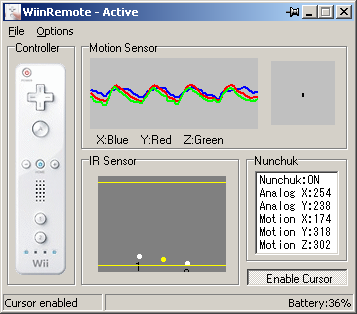
The latest version of WiinRemote can be downloaded from:
http://onakasuita.org/wii/index-e.html
What's new:
added Assign for Cursor Move,Execute. and some options
Also, I noticed there is now a Source Code link. If you are a Delphi programmer and looking to get into programming for the wii-mote for windows, this is a great way to get started.
--
I'm interested to see what can be done with the new 'execute' function. It looks like you can launch an external program. Something tells me that can be useful... but i'm not sure how yet.. anyone have any ideas?
So you just got your greasy hands on a wii-mote. What can you do with it? You may have heard about people doing crazy things like playing the drums with it, and you may have seen videos on youtube of nerds using it to control their PC mouse. Despite all of the comments you may read below the videos on youtube, most of the videos are not fake. There are really people playing electronic instruments, playing half-life, controlling emulators, navigating google earth, and even more stuff I promised not to show you yet...
This post is all about Wii-Motes and Mii's. If you still have not gotten your Wii-Mote connected to your computer now is the time to get a known working wii compatible bluetooth adapter and join in on all the fun. Once your bluetooth adapter is connected, follow these simple instructions to connect the wiimote to your bluetooth adapter.
Once you have a driver installed and your wiimote's HID device is connected, you are ready to download some apps.
 Wii-Mote Apps for Windows Wii-Mote Apps for Windows
For Windows you will definitely want to check out GlovePIE along with a host of other scripts.
These scripts will allow you to control all kinds of applications. GlovePIE is really a great program because it allows you to map buttons and values on the wii-mote to trigger keypresses in other applications.
 Another great program for Windows Mii-Mote users is BigRedPimp's Wii-Mote App Another great program for Windows Mii-Mote users is BigRedPimp's Wii-Mote App
Not to be left out:
OSX users should check out DarwiinRemote or learn how to use the WiiMote with FrontRow
And, For Linux wii-mote adventures WMD by e-Hernick is the way to go.
Transferring Mii's
A new version of MiiTransfer has been released. MiiTransfer 0.9.1 (released 12/13) should work with most, if not all, BT stacks.. The original version only supported the Microsoft Bluetooth stack. Download the latest bins and source code here:
http://sourceforge.net/projects/wdml/
Even better, one of the visitors to this site has created a GUI to make using MiiTransfer even easier. SWiitPii was so kind as to give me all the credit, but the truth is, I did not write a line of code for this program. In any case you can download the MiiTransfer Gui Kit here. I have tried it myself and I was able to easily transfer about 20 Celebrity Mii's from WiiModWii Transfer Station to my Wii in a few minutes. It is basically the .0.9.1 version of the MiiTransfer binaries from sourceforge along with another .NET program that runs the correct command line parameters for you. It works great, thanks for the software SWiitPii! If you need help with this app there is a support forum here
 MiiPlaza.net is now hosting Mii's. They have a large community of people, and I see good things coming from their site real soon. If you can't wait and just want to download as many Mii's as possible, then head on over to WiiModWii's Mii Transfer Station to download the latest celebrity mii's and other user submitted Mii's. Otherwise if your picky of what Mii's go into your Wii, and you need to see pictures of them before you download, goto MiiPlaza. MiiPlaza.net is now hosting Mii's. They have a large community of people, and I see good things coming from their site real soon. If you can't wait and just want to download as many Mii's as possible, then head on over to WiiModWii's Mii Transfer Station to download the latest celebrity mii's and other user submitted Mii's. Otherwise if your picky of what Mii's go into your Wii, and you need to see pictures of them before you download, goto MiiPlaza.
You can not break your wii by uploading Mii's from the internet. Any corrupted bits in the .mii file and the Wii won't even display it. Have fun!
WMD is a python script for linux that will allow you to comminucate with the wiimote and fully supports motion data, IR pointer functionality and button presses. e-Hernick, the WMD author can explain it better:
actually there is a lot more..
It has advanced, multi-mode, adaptive, distance-dependent, predictive, smoothed pointer control.
It has advanced, fully scriptable graphing capabilities for accelerometer data
As well as primitive motion analysis
The ability to map any Wiimote button to any key, key combination or mouse button.
The ability to configure all the parameters that tweak every algorithm
Also from the website:
-WMD is a Linux Driver for the Nintendo Wii Remote
-WMD lets you use the Wiimote as a mouse
-WMD lets you use the Wiimote as a keyboard
-WMD lets you use the Wiimote as a vibrator
-WMD is dangerous and experimental
-WMD could make your Wii explode!
WMD has been greatly improved over the last few days, with live graphing and gesture graphing support! Get it now at http://www.ForTheWiiN.orgSounds great! Thanks for all of your hard work e-Hernick!
vkapadia has posed several scripts for GlovePIE, a Windows program which lets you use the Wii-Mote as your mouse, or to control games on your PC. You will need to successfully connect the WiiMote to your PC using a compatible bluetooth adapter first. There are detailed instructions posted here. Once you have GlovePIE and the wii-mote successfully connected, download one of the following scripts (right click and save-as) and then load it into GlovePIE.
Scripts for using the Wiimote in Windows with GlovePIE:
WiiMouse IR
Point with your Wiimote and click! REQUIRES SENSOR BAR
Chances are, this is the one you want.
WiiMouse Accel
Tilt and rotate the Wiimote to control the mouse.
WiiMouse IR Relative
Moves the mouse based on the Wiimote's position relative to the center of the screen.
Two WiiMice
Connect two Wiimotes to control two mice. REQUIRES SENSOR BAR
WiiMouse IR Odd Bar
Before version .24, some sensor bars were not functioning properly. REQUIRES SENSOR BAR
Generic Joystick Driver
This uses the tilt/rotate as two axes, and all 11 buttons to emulate a joystick. REQUIRES PPJOY
Nintendo 64 Emulator - Ocarina of Time
A little awkward, but not too bad.
Nintendo 64 Emulator - Goldeneye (basic)
All buttons are digital in this script.
Nintendo 64 Emulator - Goldeneye (advanced)
In this, there is analog control support.
Nintendo Entertainment System Emulator
Basic controls for an NES emulator. Turn the Wiimote sideways for this one.
The final driver to complete Wii-Mote takeover on the computer has been posted for public consumption. e-Hernick has released python source code to use the Wii-Mote as a mouse in linux X.Org.
This completes the Wii-Mote's tour of each Operating System. There is now wii-mote driver for osx, wii-mote driver for linux, and wii-mote driver for windows. Needless to say, if you don't already have a wii-mote what are you waiting for?
People are already playing half-life with their wii-motes, and making music. What can yours do? If you have a cool Wii related hack and would like to see it on this page drop me an email: liquidice629 at gmail.com
It's good to see the Japanese have started to hack their Wii's already! Well, wii-motes anyway...

Hirolog posted this Wii-Mote Application for OSX which allows you to control and monitor several features of the Wii-Mote using OSX. There is also a mouse mode, but the calibration of my wii-mote must be different because my mouse pointer keeps going to the bottom left corner of the screen when it's active.
More Info From Hirolog:
- DarwiinRemote is a tiny software which reads data from and sends data to Nintendo Wii Remote
 - Inputs
- 3-axis acceleration sensors
- all buttons except power button on/off
- Output
- DarwiinRemote makes us control other applications by using Wii Remote
- but now only supports "AppleRemote" mode...
Download the software here: http://blog.hiroaki.jp/2006/12/000433.htmlUPDATE: 12/10/06 - DarwiinRemote 0.3 is released!! This version supports IR sensor and motion sensor calibration. Enjoy! New Project Page: http://sourceforge.net/projects/darwiin-remote/
 Also, from our new Japanese friends, here is another Japanese Wii Hacking Website which has similar software for Windows called WiinRemote. Get it here: http://onakasuita.org/wii/index-e.html
CarlKenner, has posted his wiimote application to the WiiLi forums. This is an amazing accomplishment on it's own, but to add even more to the coolness of this is the fact that Carl DOES NOT EVEN HAVE A WIIMOTE!
Kudos to Carl for writing this software, and having it work on the first try without the actual hardware. I am downloading the files now to test them out and I'll have a full report for you tomorrow on how it all works. Until then you can try it out for yourself by downloading the Windows wii-mote drivers here:
http://www.wiili.org/forum/download-windows-driver-here-t294.html
|
|